Ishin Codes
Grab free Yen and Rerolls for Ishin on Roblox. Copy a code below, then claim it in-game.

01 THE CODE LIST
Latest Ishin codes
ReviewedTry Latest first. Older codes with conflicting reports appear under Mixed.
STICKERS65 RerollsReportedNEWUI12,500 YenReward reports differ.ReportedQUICCPATCH24-hour dropCurrent availability unclear.Mixed1M45 RerollsMixedSKATE65 RerollsMixedRIDE13,500 YenMixedsrydude35 RerollsMixed3KTHANKS45 RerollsMixedrestart40 RerollsMixedSOSORRY40 RerollsMixedWATER5,000 YenMixedPETS12,500 YenMixedHALLO65 RerollsMixedWHEELS—ExpiredGG—Expiredripscythe—ExpiredRELEASE!—ExpiredWEBACK—Expired
No matching codes in this list. Clear your search or choose All.
02 REDEMPTION GUIDE
How to redeem Ishin codes
Join luure on Roblox
Open the luure community and join with the same account you’ll use to play.
Load into Ishin
Launch Ishin, then create or select a character. Wait until you’re in the game world.
Open the Codes menu
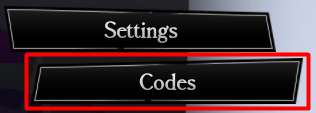
Press Tab on keyboard, use the menu button on controller, or tap the three-line menu icon on mobile. Select Codes.
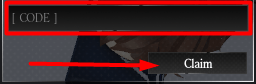
Paste your code and select Claim
Keep the original capitalization and punctuation. After you claim, read the message below the field to see what Ishin granted or why it rejected the code.
03 TROUBLESHOOTING
Ishin codes FAQ
What to check if Claim doesn’t give you a reward.
Why isn’t my Ishin code working?
Check that you joined luure on the account you’re playing on. If you just joined, leave Ishin and rejoin before trying again. Paste the code again to avoid extra spaces or changed capitalization. For example, srydude stays lowercase.
If Ishin says the code was already claimed, try a different one. If the code still comes back invalid, it may have expired. Try a code under Latest first.
Where do new Ishin codes appear?
Check the Ishin Discord for developer announcements, particularly around updates. Copy the code exactly as posted and use the in-game Codes menu to claim it.
What do Ishin codes give you?
Code rewards include Yen, Ishin’s in-game currency, and Rerolls, which you can use to roll character traits again. Check the reward column before you claim, then read the in-game message to confirm what you received.